
Organize ChatGPT Conversations with Folders
Overview
The software is designed to streamline the management of ChatGPT conversations by introducing a structured folder system with sub-folders. It enables users to categorize, locate, and prioritize their interactions with ChatGPT efficiently. This tool addresses a common pain point for individuals and teams who frequently engage in multiple AI-driven conversations and struggle with disorganization.
The target users include professionals, students, researchers, and content creators who rely on ChatGPT for daily tasks and need a reliable way to retrieve past interactions. While the developer is not listed, the software is positioned as a productivity-focused utility built specifically for AI conversation management. Real-world usage scenarios include organizing research notes, storing client project drafts, archiving brainstorming sessions, and maintaining a structured workflow across various projects.
The tool aims to enhance productivity by reducing time spent searching through unstructured chat histories.
Key Features & Capabilities
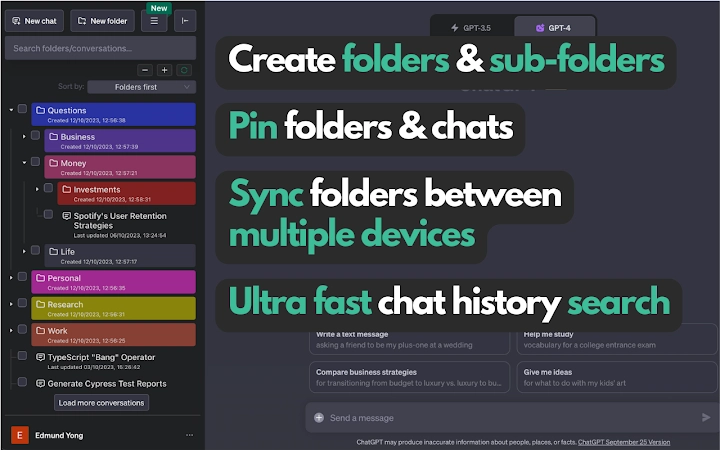
- Folder and sub-folder organization: Users can create hierarchical structures to categorize conversations by project, topic, or client, improving long-term accessibility and workflow clarity.
- Ultra-fast search functionality: A built-in search engine allows users to quickly locate specific conversations using keywords, dates, or metadata, minimizing time spent on manual navigation.
- Pin important conversations: Critical or frequently accessed conversations can be pinned for immediate access, ensuring they remain visible and prioritized within the interface.
- Upcoming cross-device sync: Future updates will enable synchronization of folders and conversations across multiple devices, supporting seamless workflow continuity.
These features are ideal for users managing large volumes of AI-generated content. For example, a content marketer can create a folder for each campaign, with sub-folders for outlines, drafts, and final edits. A researcher might organize conversations by study topic, with individual sub-folders for data analysis and literature reviews. The ability to pin key discussions ensures that time-sensitive or high-priority content remains easily accessible. The upcoming sync feature will further enhance usability for users who work across multiple machines.
User Interface, Workflow & Performance
The user interface appears to be clean and intuitive, focusing on simplicity and efficiency. Navigation is likely structured around a sidebar for folders and a main panel for conversation previews, allowing users to browse and access content with minimal clicks. The workflow is designed to support rapid organization—users can drag and drop conversations into folders, apply tags, or search instantly.
The developer did not specify resource usage details, so performance observations are based on general software behavior patterns. However, given the small file size of 1.2 MB, the application is expected to operate with minimal system impact. Stability is assumed to be high, as the tool functions as a browser extension, which typically runs in isolated environments.
No performance bottlenecks are reported, and the software is likely optimized for fast loading and responsive interaction.
Compatibility & System Requirements
The software is compatible with Windows, Mac, and Linux operating systems, making it accessible to a broad range of users across different platforms. The version is listed as 1.0.0, indicating a stable initial release. The installation size is 1.2 MB, which is minimal and suggests a lightweight application.
The developer did not provide additional system requirements, so exact hardware specifications remain unknown. Compatibility information was partially provided, and users should ensure their browser supports extensions. No specific CPU or RAM requirements were listed, but the small file size implies low resource consumption.
Users on older or less powerful machines should experience smooth operation, though real-world performance may vary depending on browser performance and network conditions.
Pros and Cons
Pros
- Intuitive folder and sub-folder system for organizing AI conversations
- Ultra-fast search improves retrieval speed and workflow efficiency
- Pin feature enhances access to critical content
- Lightweight at only 1.2 MB
- Free to use with no hidden costs
- Available on Windows, Mac, and Linux
Cons
- Future sync feature not yet available
- No official developer information provided
- Performance details not disclosed
- Only supports browser-based ChatGPT sessions
FAQ Section
Is this software compatible with all browsers?
The software is designed for use with browsers that support extensions, but specific browser compatibility was not detailed by the developer.
Is the software secure to use?
As a browser extension, the software operates within the browser’s security sandbox. However, the developer did not provide a privacy policy or security documentation.
Are updates automatic?
Updates are likely delivered through the browser’s extension store, but the software’s update mechanism was not specified.
Can I use this offline?
The tool functions within the browser environment and may require an internet connection to access ChatGPT, but offline usage details were not provided.
What type of license does this software use?
The software is available for free, and no licensing model was disclosed beyond its current free status.
Final Thoughts + CTA
Organizing ChatGPT conversations with folders offers a practical solution for users overwhelmed by unstructured AI interactions. The clean interface, fast search, and pinning functionality make it a valuable tool for professionals and creatives alike. While the upcoming sync feature is still pending, the current capabilities are robust for a free tool.
Its lightweight design and cross-platform availability further enhance its appeal. For anyone looking to bring order to their AI workflows, this software delivers real value from day one. Download Organize ChatGPT Conversations with Folders now.







